


BCBSIL
4.41.60K Reviews
App Specs
- Version
- 7.29.0
- Updated On
- License
- Free
- Downloads
- 500,000+
- Developer
- Blue Cross and Blue Shield of Illinois
- Categories
- Medical
- Platform
- Android
Screenshots
 Analysis by AppCompare
I look at BCBSIL as a practical member tool rather than a general health app. Its value is in putting insurance tasks—checking claims, reviewing benefits and looking for care—in one place. If you already have coverage through Blue Cross and Blue Shield of Illinois, that can save time when a question comes up. If you’re looking for symptom advice, a complete medical record or a way to compare unrelated insurance plans, this isn’t the app I’d choose.
Where the first snags tend to happen
The main hurdle is not learning a complicated interface; it is getting into the right member account. Before trying to register, I’d have the member ID available and check that I’m using the details associated with the person whose coverage I need to manage. Family coverage can make this especially relevant: the person holding the phone may not be the person whose claims or benefits they are trying to view.
If a sign-in or registration step does not work on the first attempt, I would pause before repeatedly submitting the same information. Recheck the spelling and numbers you entered, and make sure you have selected the correct member details. A mismatch can look like an app problem when it is really an account-information problem. For anything involving private coverage details, I’d use the app’s own account-help route rather than sending personal information through an informal message.
Small checks that make setup easier
BCBSIL is a free medical app from Blue Cross and Blue Shield of Illinois. It has been available since December 17, 2010, and version 7.24.0 supports devices running Android 9 or later. That gives prospective users a quick compatibility check to make before downloading. The app is rated for Everyone, but its insurance information is intended for members, so the useful question is less about age and more about whether you have a BCBSIL account to use.
I’d also treat the app as a convenient view of plan information, not as a replacement for the official terms of coverage. Before an appointment, check the details that matter to that visit—such as whether a provider appears in-network and what your plan says about the service. Provider listings and benefit details are useful planning tools, but I would confirm anything financially important with the insurer or provider before relying on an assumption.
Recovering your workflow when information looks stale
Claims and other insurance records do not always change at the same moment a member takes action. If a claim still appears unchanged after you have submitted it, I would note when the service took place and when the claim was filed, then check again later rather than treating a quiet screen as proof that it was rejected. Keep any paperwork or confirmation you already have, so you can give customer support a clear description if you need help.
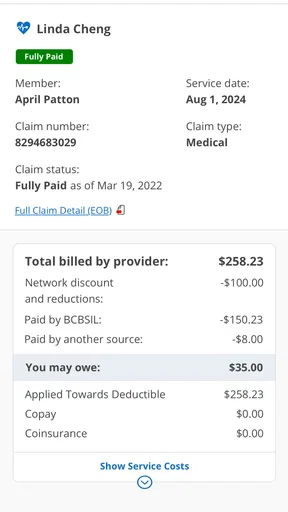
The same calm approach helps when you are comparing a bill with the app. A provider bill, an insurer’s claim record and the amount a member may owe are related, but they are not necessarily the same document or stage of processing. I use the app to orient myself and identify what needs follow-up; I do not assume that one screen settles a billing dispute. If the figures do not line up, ask the provider and insurer which record is current before paying an amount you do not understand.
Worth Reading Before You Choose

EA SPORTS FC Mobile 26 Is a Bigger Football Game, but It Takes Time

Flipboard Shows What News Apps Must Do Beyond the Feed

Switching to Android Auto Means Rethinking Your Driving Routine

Google Calendar Makes a Crowded Week Easier to Manage

Ludo King Makes the Most of the Minutes Between Plans

Baby Panda World Brings Quick Play to Modern Phones, but Its Game Library Feels Busy
When the app is not the cause
Sometimes the issue is a plan rule, a provider’s billing process or a record that has not finished moving through the system—not a broken phone app. A doctor appearing in a search is a helpful starting point, but it does not guarantee that every service at that office is handled the same way. Before a costly or specialized visit, I’d confirm the provider and the particular service with the relevant office and insurer.
It is also worth separating an insurance question from a medical one. BCBSIL can help me navigate member information, but it is not a substitute for a clinician’s advice or urgent care. If I need medical attention, I would contact an appropriate health professional rather than waiting for an insurance screen to explain what to do.
Who will get the most from it?
The app makes the most sense for someone who already has BCBSIL coverage and wants to check plan details or claims while away from a computer. It can be handy before calling a provider, when preparing for a routine appointment, or when trying to understand what follow-up a claim might need. Someone without this coverage, or someone who only wants general wellness content, is unlikely to get the same value from it.
Compared with a provider’s own portal, BCBSIL is the place I’d look for insurer-side information such as benefits and claims; a clinic’s portal is generally the more direct place for that clinic’s appointments and records. Compared with calling member services, the app offers a self-serve way to check information, while a representative is the better choice when a detail needs interpretation or correction. I see those options as complements, not interchangeable sources.
How I’d use it in an ordinary week
Imagine I’m arranging a specialist visit in an unfamiliar part of Illinois. I can use Find Care to look for a provider and narrow the search to in-network options, then save a suitable result for later. Before booking, I’d call the office to confirm it accepts my specific plan and ask about the service I need. That extra call is not busywork: it helps catch differences between a directory result and the practical details of scheduling or billing.
After the visit, I can return to Claims to see whether an insurer record has appeared and review the benefit information that may help me understand the next step. If it has not updated, I would keep the bill and visit details handy and check again rather than making a quick conclusion. This is where the app is most useful to me: it gives insurance tasks a clear place to start, without pretending to resolve every question on its own.
For households, a useful habit is to check whose member information is on screen before discussing a claim or appointment. That simple pause can prevent mixing up one person’s coverage with another’s. I would also avoid treating a saved provider as a permanent recommendation; network participation and suitability should be checked again when the next appointment is planned.
Using BCBSIL day to day
If you’re on the hunt for an app that makes managing health insurance not just a necessity but a breeze, you might want to check out BCBSIL. Whether you’re navigating through claims, hunting for a doctor, or just trying to keep an eye on your benefits, this app aims to make the whole experience as smooth as possible. So, let’s dive into what makes this app tick.
Getting Started with BCBSIL
First things first, downloading the BCBSIL app is a cinch. Available on both Android and iOS, it’s a quick download and doesn’t take up much space on your phone. Once installed, setting up an account is straightforward. You’ll need your member ID handy, but the app guides you through the rest with ease.
Navigation and Features
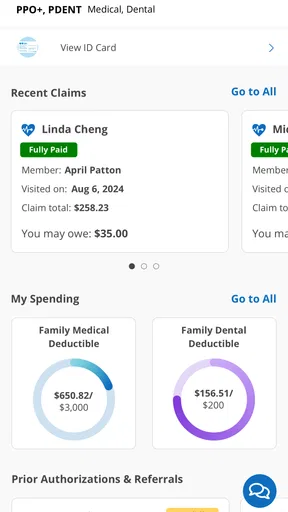
One of the first things I noticed was how clean and intuitive the interface is. You’re greeted with a dashboard that gives a clear overview of your policy. The menu is simple, with options like Claims, Benefits, and Find Care right at your fingertips. What’s cool is that it doesn’t feel overwhelming, even though there’s a lot of information packed in.
Let’s talk features. The Claims section is where you’ll spend a lot of your time. It provides a detailed list of your claims, and you can see the status at a glance. This section is super handy if you want to keep tabs on what’s covered and what’s not.
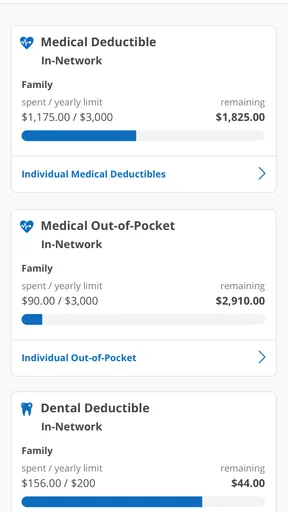
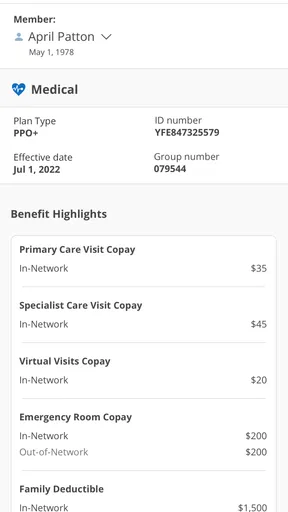
The Benefits section gives a breakdown of your plan. You can check out what’s included, any deductibles, and your out-of-pocket maximums. It’s pretty nifty to have all this info right in your pocket instead of sifting through paperwork.
Finding Care Made Easy
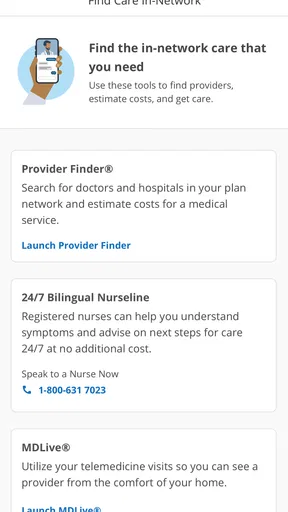
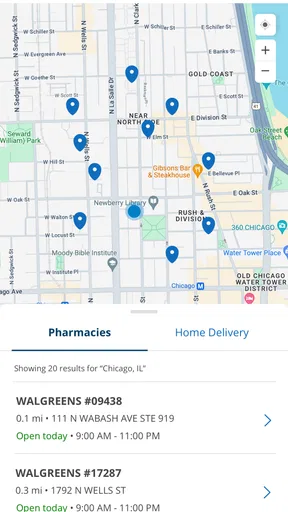
Need to find a doctor or a specialist? The Find Care feature is a lifesaver. You can search by name, specialty, or even location. It’s integrated with maps, making it super easy to get directions. I found this particularly useful when I was looking for a specialist in a new area.
What’s more, you can filter your search to see who’s in-network, which is a fantastic way to avoid unexpected bills. The app even lets you save your favorite providers for quick access later.
Additional Perks
Besides the basics, BCBSIL throws in a few extra goodies. There’s a health assessment tool that gives you insights into your health habits and offers tips for improvement. While not groundbreaking, it’s a nice touch if you’re into tracking health metrics.
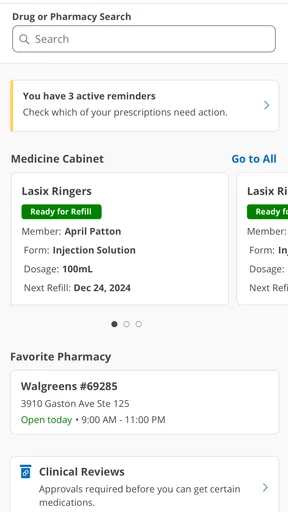
Another neat feature is the notifications. You can set them up to remind you of appointments, refill prescriptions, or alert you when a claim is processed. It’s like having a personal assistant to keep you on track with your health management.
What Could Be Better?
No app is perfect, right? While BCBSIL is pretty solid, I did notice a couple of minor hiccups. The app can sometimes be a bit slow to update information, especially after submitting a claim. It’s not a deal-breaker, but it can be a tad frustrating if you’re waiting on important info.
Also, while the app is packed with features, a bit more customization in the dashboard could go a long way. It would be cool to arrange sections based on what you use most often.
The Final Word
All in all, the BCBSIL app is a solid companion for anyone navigating the world of health insurance. It’s user-friendly, packed with essential features, and most importantly, it’s reliable. Whether you’re checking claims, finding a doctor, or managing your benefits, it’s got you covered.
If you’re a member of Blue Cross and Blue Shield of Illinois, this app is a no-brainer to download. It’s not just about convenience; it genuinely helps you manage your healthcare more effectively. So, give it a whirl and see how it can simplify your life!
My practical verdict
With an average rating of 4.5 from around 5,800 ratings, about 1,500 written reviews and over 500,000 installs, BCBSIL has clearly found an audience among members who want insurer information within reach. Those figures are useful context, but they do not tell me whether a particular plan’s details will match my needs. I’d judge the app by whether it helps me answer the next practical question: what is happening with a claim, what does my plan say, or where should I start looking for care?
At no charge, it is an easy option to try if you are an Illinois Blue Cross and Blue Shield member with a compatible device. Its current version is 7.24.0, and the app has been around since 2010, which gives it the feel of an established member service rather than a new experiment. Still, I would not install it expecting a universal health dashboard. Its usefulness depends on having the matching coverage and on the particular task being insurance-related.
My strongest recommendation is to use it as a starting point for member self-service, then confirm consequential details through the appropriate source. It can reduce the effort of finding basic plan and claim information, but it cannot make a provider’s billing process simpler or replace a conversation when records conflict. If you prefer speaking to a person for every insurance question, or you do not have BCBSIL coverage, the app may add little to your routine. For members who are comfortable checking details on a phone and following up when something needs clarification, it is a useful companion rather than a complete solution.
Pros
- User-friendly interface simplifies navigation.
- Secure login ensures data privacy.
- Comprehensive health plan details available.
- 24/7 customer support via chat.
- Easy access to claim information.
Cons
- Limited mobile app functionality.
- Occasional app crashes reported.
- Some features require internet access.
- Updates can be infrequent.
- Limited customization options.
FAQs for BCBSIL
What is BCBSIL and what services does it offer?
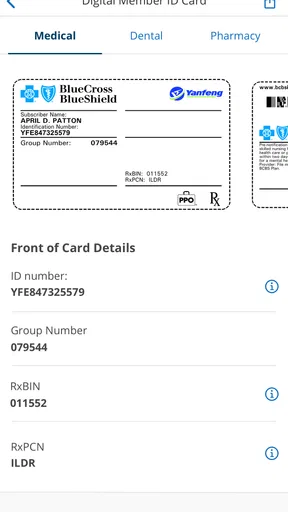
BCBSIL, or Blue Cross and Blue Shield of Illinois, is a health insurance provider offering various plans for individuals, families, and businesses. The app provides access to your insurance details, digital ID cards, claims tracking, and a directory of in-network doctors and hospitals. It's designed to simplify managing your healthcare needs.
How do I register and log in to the BCBSIL app?
To register, you’ll need your member ID number, which can be found on your insurance card. Once registered, you can log in using your username and password. The app offers a secure login process with options for biometric authentication like fingerprint or facial recognition for convenience.
Can I view and manage my claims through the BCBSIL app?
Yes, the BCBSIL app allows you to view and manage your claims efficiently. You can check the status of recent claims, see detailed explanations of benefits, and track past claims. This feature helps you stay informed about your healthcare expenses and insurance coverage.
Does the BCBSIL app provide access to telehealth services?
Yes, the BCBSIL app includes access to telehealth services, allowing you to consult with healthcare professionals remotely. This feature is especially useful for minor health issues, enabling you to receive care without visiting a doctor's office. Ensure your plan includes telehealth benefits.
How does the BCBSIL app help with finding healthcare providers?
The BCBSIL app provides a comprehensive directory of in-network healthcare providers, including doctors, specialists, and hospitals. You can search by location, specialty, or provider name. This tool helps ensure you receive care within your network, optimizing your coverage and reducing costs.


